Google Keep is a powerful yet simple-to-use note-taking application that’s part of Google’s productivity suite. Whether you’re a student, a professional, or simply someone who loves to keep things organized, Google Keep offers intuitive tools and features to streamline your workflow. In this article, we’ll explore the essentials of how to use Google Keep, covering everything from basic note creation to advanced organizational tips.
Getting Started with Google Keep
Watch our full step-by-step video tutorial on Google Keep 👇
To start using Google Keep, all you need is a Google account. Access Keep through the web application or mobile app, available for both Android and iOS.
Creating Your First Note
Creating a note is straightforward:
- Click on “Take a note…” at the top of the Keep interface.
- Add a title in the top field, and type your note below.
This simplicity is part of Google Keep’s appeal; as described in the video tutorial, there’s “beauty in the simplicity.”
Organizing Your Notes
Organization is key to productivity, and Google Keep excels at keeping your notes tidy.
Pinning Notes
One essential feature is pinning notes. Pinning a note keeps it at the top of your notes, ensuring it remains visible and accessible. Simply click the pin icon at the top-right corner of your note.
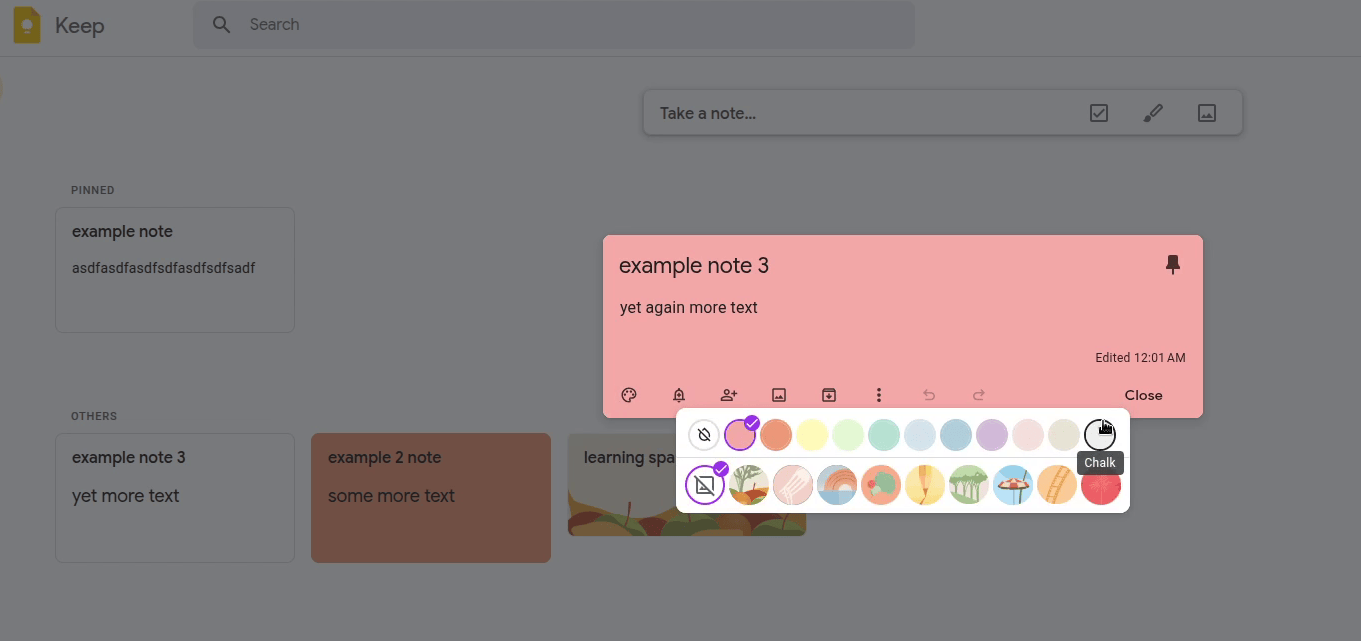
Changing Background Colors
Google Keep lets you customize the background color of your notes. This helps visually categorize notes by topic or importance. To change a note’s color:
- Click the palette icon and select your preferred color or background theme.

Advanced Note-Taking Features
Using Checkboxes
Google Keep supports checkboxes, turning your notes into interactive to-do lists. Activate checkboxes by clicking the three-dot menu and selecting “Show checkboxes.” You can rearrange list items and even create sub-lists, enhancing organization.


Adding Images and Drawings
Google Keep allows for multimedia notes:
- Images: Click the image icon to upload pictures from your device. Ideal for visual references or screenshots.

- Drawings: Select the drawing option to sketch directly within your notes, providing a creative way to jot ideas visually.

Collaboration and Sharing
Collaborate easily by sharing your notes:
- Click the “Add collaborator” icon to invite others via their Google account. This feature is perfect for team projects or shared grocery lists.
Archiving and Deleting Notes
Google Keep helps you declutter without losing important information:
- Archive: Temporarily hides notes without deleting them, keeping your workspace clean.
- Delete: Moves notes to the trash, where they remain for seven days unless manually deleted sooner.
Integrating with Google Docs
A standout feature of Google Keep is its seamless integration with Google Docs:
- Send notes directly to Google Docs by clicking the three-dot menu and choosing “Copy to Google Docs.” This is invaluable for transferring quick notes into detailed documents.
Benefits of Using Google Keep
- Easy-to-use interface: Intuitive and straightforward, ideal for beginners.
- Free and accessible: Part of Google’s free productivity suite.
- Rich multimedia support: Incorporates images, drawings, and checklists.
- Effective organization: Pinning, archiving, and color-coding improve productivity.
- Collaboration-friendly: Real-time note sharing enhances team workflows.
Conclusion
Google Keep is a versatile note-taking tool suitable for various personal and professional tasks. From simple text notes to interactive checklists and collaborative documents, Google Keep’s features empower users to stay organized effortlessly.
Watch our detailed YouTube tutorial embedded above for an in-depth demonstration of these features. Happy note-taking!
🚀 Embark on an Epic Time-Travel Adventure with Watson! 🐕🦖🎨
Take a journey through time with Watson the Time-Travelling Dog: Dogs and Dinosaurs Adventure Coloring Book 1.
Join Watson and his dog brother Sherlock as they meet dinosaurs, make new friends, and embark on an unforgettable adventure! Perfect for kids, dog lovers, and coloring book enthusiasts alike.
Why you'll love it:
- Engaging, fun-filled story
- Beautiful illustrations to color
- Ideal for family fun or a thoughtful gift
Ready for an adventure that sparks creativity and fun? 📖 Grab your copy today and let the time-traveling excitement begin!
Get your book now 👇